Z-Image Base vs Turbo: The Ultimate Guide to Perfect Chinese Text Generation
In the rapidly evolving landscape of generative AI, one challenge has remained consistently stubborn: text rendering, specifically for complex scripts like Chinese (Hanzi). For years, creators have struggled with "AI gibberish"—where beautiful images are ruined by squiggly lines that vaguely resemble characters but carry no meaning.
While general-purpose models like Midjourney or Stable Diffusion have made incremental progress, they often lack the structural understanding required for the intricate strokes of Asian languages.
Enter Z-Image, a foundation model architecture built from the ground up to solve this specific problem.
In this comprehensive guide, we will go beyond the basics. We will dissect the technical architecture of our two flagship models—Z-Image Base and Z-Image Turbo—analyze their trade-offs, and provide a professional workflow for turning these static assets into high-quality videos using our partner tool, Kling 2.6.
The Core Problem: Why is Hanzi So Hard?
To understand why Z-Image is necessary, we must first understand the difficulty of the task. Unlike the Latin alphabet, which consists of 26 relatively simple shapes, Chinese characters are logograms. A single character can be composed of dozens of specific strokes (dots, horizontal lines, vertical hooks) that must be placed with absolute spatial precision.
Traditional diffusion models treat text as "texture." They approximate the look of writing without understanding the structure. This results in the "uncanny valley" of text—characters that look Chinese from a distance but fall apart upon closer inspection.
Z-Image changes this paradigm by integrating structural awareness into the generation process. But not all generation needs are the same, which is why we offer two distinct engines.
Technical Showdown: Base vs. Turbo
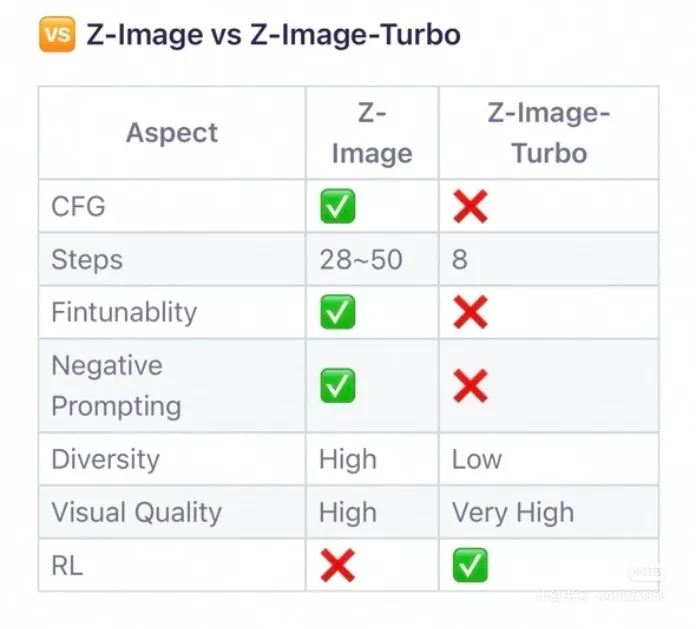
Choosing the right model is not just about preference; it's about matching the technical specifications to your project's constraints. Let's look at the data.
1. Z-Image Turbo: The Commercial Speedster
Z-Image Turbo is an engineering marvel designed for one specific purpose: Commercial Efficiency.
-
Architecture & Optimization: As confirmed in our technical analysis, Turbo utilizes Reinforcement Learning (RL) optimization. This is a crucial differentiator. RL allows the model to "learn" the optimal path to a high-quality image, stripping away unnecessary noise and calculation steps.
-
Inference Speed: Turbo operates at a blazing 8 inference steps. In the world of diffusion models, where standard generations often take 30-50 steps, this is a massive leap forward. It means you can generate assets in a fraction of the time, making it ideal for high-volume workflows.
-
Configuration Constraints: Speed comes with trade-offs. Turbo does not support Classifier-Free Guidance (CFG) or Negative Prompting. It is a "what you ask is what you get" model. The lack of fine-tuning knobs means it is less flexible, but it is highly reliable for its intended use case.
-
Visual Fidelity: Rated as "Very High" for visual clarity. Because it is optimized for text legibility, it produces sharp, high-contrast characters perfect for reading.
2. Z-Image Base: The Artistic Foundry
Z-Image Base is a robust diffusion model designed for Creative Control.
-
Architecture: Base follows a more traditional diffusion pipeline, allowing for a gradual denoising process that introduces rich details and stylistic nuances.
-
Inference Depth: Running between 28 to 50 steps, Base takes longer to generate. However, this extra time is spent resolving complex lighting, textures, and integrating text into the environment in a natural way.
-
Advanced Control: Unlike Turbo, Base fully supports CFG (Classifier-Free Guidance), Negative Prompts, and Fine-tuning. This gives professionals the ability to steer the generation.
- Want the text to look like it's carved into stone? Increase the CFG.
- Want to avoid blurry edges? Add "blur" to your negative prompt.
-
Diversity: Base excels in diversity (High). As we will explore in the next section, this model can interpret the same prompt in vastly different ways, making it a powerful tool for concept art and brainstorming.
The Diversity Analysis: Consistency vs. Creativity
One of the most frequent questions we receive is: "Which model is better?" The answer depends entirely on whether you value Consistency or Creativity.
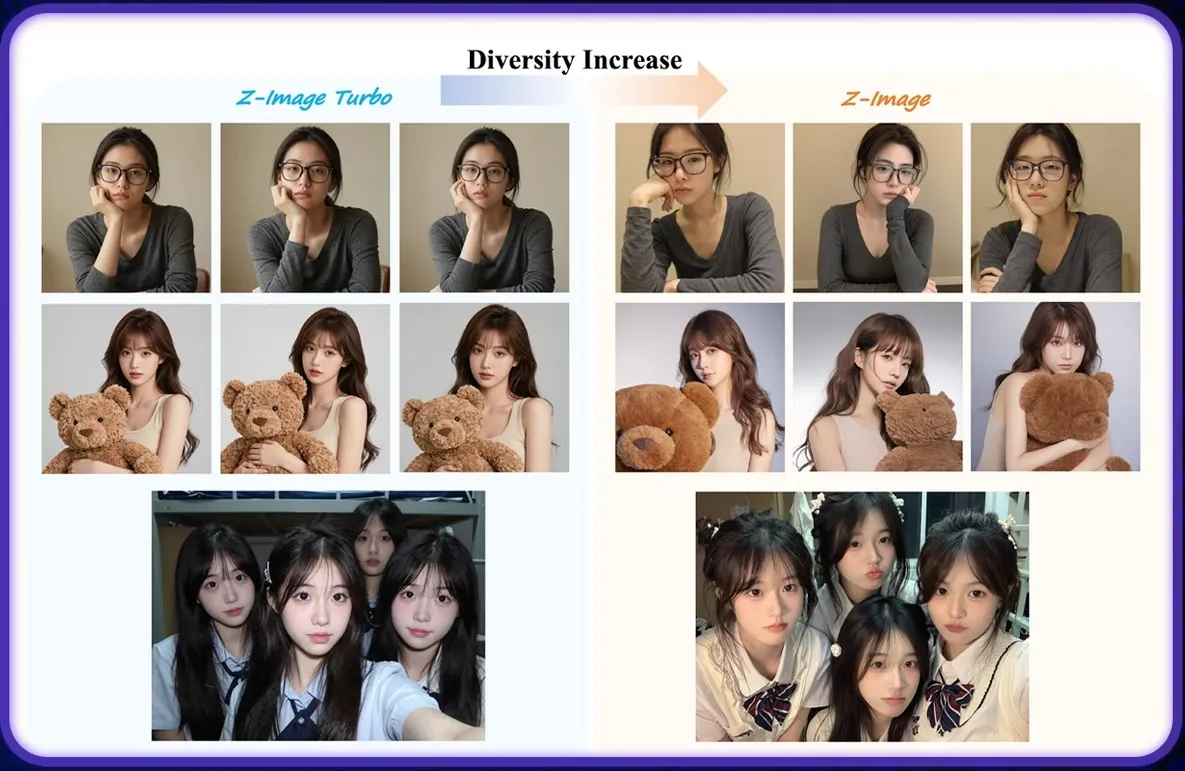
We conducted a controlled test using the same prompt across both models. The results are illuminating.
Analyzing the Turbo Results (Left)
Look closely at the Z-Image Turbo samples on the left side of the comparison image.
- The Pattern: Notice how the subject's pose, the lighting, and even the facial expression remain remarkably similar across different seeds.
- The Implication: This "rigidity" is actually a feature for commercial branding. If you are generating a series of product banners, you want the text layout and the product look to be consistent. Turbo delivers predictable results every time. It minimizes the "randomness" of AI.
Analyzing the Base Results (Right)
Now, examine the Z-Image Base samples on the right.
- The Pattern: The variation is significant. We see different camera angles, different lighting moods, and varied compositions.
- The Implication: This is perfect for the "Idea Phase." If you are a creative director looking for inspiration on how to integrate a Chinese title into a movie poster, Base will give you ten unique options to choose from. It is an exploration engine.
Industry Use Cases
To help you decide which Z-Image model fits your pipeline, we have categorized common use cases based on our user data.
Scenario A: E-Commerce & Retail (Winner: Turbo)
Challenge: You have 500 SKUs of tea products and need to generate social media images with the correct Chinese product name "高山乌龙" (High Mountain Oolong) on the packaging. Why Turbo?
- You need the text to be legible 100% of the time.
- You need to generate hundreds of images quickly (8 steps vs 50 steps saves hours of compute time).
- You don't need artistic interpretation; you need a clean product shot.
Scenario B: Film & Entertainment (Winner: Base)
Challenge: You are designing a concept poster for a sci-fi movie set in a futuristic Shanghai. The title "未来之城" (City of Future) needs to be formed out of neon lights in the rain. Why Base?
- You need the text to blend into the atmosphere (glow, reflection, texture).
- You need to use Negative Prompts to ensure the neon doesn't look like a flat sticker.
- You want to experiment with different "Cyberpunk" aesthetics using CFG scales.
Scenario C: Educational Content (Winner: Turbo)
Challenge: Creating flashcards for teaching Mandarin. Why Turbo?
- Clarity is king. The strokes must be structurally perfect for students to learn correctly. Turbo's RL optimization ensures the highest stroke accuracy.
From Static to Motion: The Kling 2.6 Workflow
Generating a perfect static image with Z-Image is only half the battle. In 2026, content is video.
However, animating text is notoriously difficult. Most video models destroy text legibility as soon as movement begins. The strokes morph, warp, and turn into alien symbols.
To solve this, we recommend a workflow that pairs Z-Image with Kling 2.6. Kling's Image-to-Video (I2V) architecture is uniquely suited for preserving high-frequency details like text strokes.
The "Text-Safe" Animation Protocol
Follow this step-by-step guide to animate your Z-Image creations without losing legibility.
Step 1: Source Generation (Z-Image)
Generate your image using Z-Image Base or Turbo.
- Tip: Ensure the text has high contrast against the background. Text that blends too much into the background (like dark text on a dark wall) is harder for the video model to track.
Step 2: Ingestion (Kling 2.6)
Navigate to Kling 2.6 and upload your image to the Image-to-Video interface. Do not use Text-to-Video, as that would require the video model to generate the text from scratch. We want to leverage the perfect text Z-Image already created.
Step 3: Prompting for Stability
The biggest mistake users make is asking for too much motion.
- Bad Prompt: "Camera flying through the text, exploding particles, fast zoom." (This will destroy the text).
- Good Prompt: "Slow cinematic pan, subtle dust particles floating, gentle breathing light effect on the text."
Step 4: Parameter Tuning
- Motion Amplitude: Keep this low (around 0.3 - 0.5 on the Kling scale).
- Camera Movement: Horizontal pans or slow zooms are safer for text than rotations.
By treating the Z-Image output as the "Ground Truth," Kling 2.6 acts as a motion engine, simply adding the dimension of time to your already perfect assets.
Advanced Prompting Strategies for Z-Image
Getting the most out of Z-Image Base requires understanding how to "talk" to the model. Since Base supports advanced parameters, here is a guide to fine-tuning your results.
Mastering CFG (Classifier-Free Guidance)
The CFG scale determines how strictly the model follows your prompt versus its own internal creativity.
- Low CFG (4-6): The text might be more artistic and blended, but stroke accuracy might decrease. Good for abstract art.
- Medium CFG (7-9): The sweet spot. Good balance of creativity and text adherence.
- High CFG (10-15): The model forces the text structure rigidly. This can lead to "fried" or over-saturated images, but the text will be very distinct.
The Power of Negative Prompts
Negative prompts are your eraser. For Chinese text generation, they are essential for cleaning up artifacts. Recommended Negative Prompts for Base:
blurry, double strokes, malformed characters, extra limbs, low resolution, jpeg artifacts, english text, messy calligraphy
Note: Remember that Z-Image Turbo ignores these parameters, so save your prompt engineering efforts for Base.
Conclusion: Which Engine Will You Choose?
The era of "AI Gibberish" is over. With Z-Image, we finally have the tools to integrate Chinese language seamlessly into AI-generated visual content.
Your choice ultimately boils down to your specific project needs:
- Select Z-Image Turbo if you are building a commercial pipeline that demands speed (8 steps), consistency, and perfect legibility for labels and signage.
- Select Z-Image Base if you are an artist or designer who needs control, diversity, and atmospheric integration for high-concept visuals.
And remember, a static image is just the beginning. By combining your Z-Image assets with the motion capabilities of Kling 2.6, you can unlock a new level of storytelling.
Start creating today. Let your visuals speak—literally.